Gobuster 사용법

Gobuster 는 Go 언어로 작성된 디렉토리/파일 열거, 서브 도메인 탐색, 가상 호스트 탐색 등을 위한 웹 퍼징 도구다.
웹 서버에 대한 모의해킹을 진행할 때, 해당 서버에 어떤 디렉토리, 파일, 리소스가 존재하는지 파악하는 것은 중요한 초기 단계다. Gobuster 는 지정한 wordlist 의 단어들을 이용하여 대상 서버에 대량의 요청을 전송하고, 그에 대한 응답을 분석하여 숨겨진 리소스를 찾아낸다.
유사한 기능을 제공하는 ffuf 와는 달리 Gobuster 는 기능을 모드로 나누며, 이 글에서는 dir, fuzz, dns, vhost 모드에 대해 다룬다. 예제에서 사용하는 wordlist 는 SecLists 를 사용했다.
1. 설치
1.1 Linux
Kali Linux에는 기본적으로 설치돼 있다.
$ gobuster
NAME:
   gobuster - the tool you love

USAGE:
   gobuster command [command options]

VERSION:
   3.8

AUTHORS:
   Christian Mehlmauer (@firefart)
   OJ Reeves (@TheColonial)

COMMANDS:
   dir      Uses directory/file enumeration mode
   vhost    Uses VHOST enumeration mode (you most probably want to use the IP address as the URL parameter)
   dns      Uses DNS subdomain enumeration mode
   fuzz     Uses fuzzing mode. Replaces the keyword FUZZ in the URL, Headers and the request body
   tftp     Uses TFTP enumeration mode
   s3       Uses aws bucket enumeration mode
   gcs      Uses gcs bucket enumeration mode
   help, h  Shows a list of commands or help for one command

GLOBAL OPTIONS:
   --help, -h     show help
   --version, -v  print the version
Ubuntu 와 같은 Linux OS 에서는 apt 설치 명령어로 Gobuster 를 설치할 수 있다.
$ sudo apt install gobuster
1.2 Windows
Windows OS 는 github의 gobuster 저장소 release 페이지에서 ZIP 파일을 다운로드한다. 일반적인 Windows 사용자는 gobuster_Windows_x86_64.zip 을 다운로드한다.
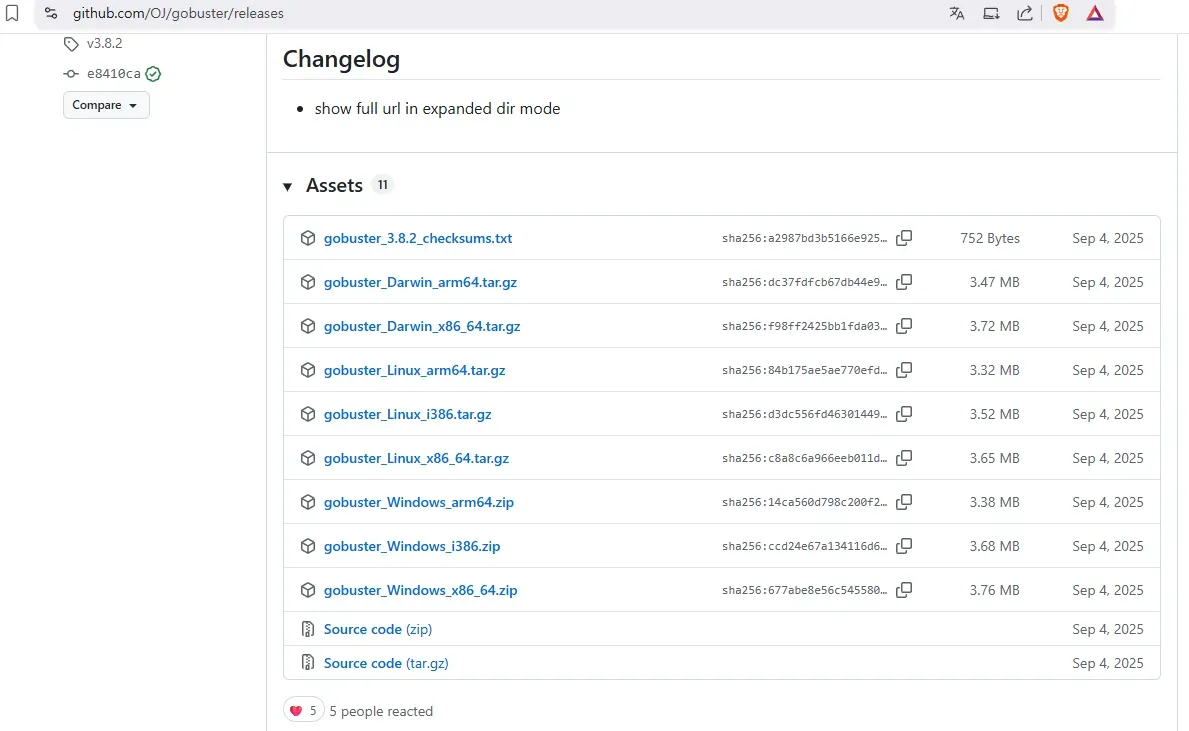
ZIP 압축 해제하면 폴더 안에 gobuster.exe 을 사용할 수 있다.
2. 기본 사용법
Gobuster 는 모드를 먼저 지정한 후 옵션을 사용하는 방식이다. 디렉토리 및 파일 탐색에는 dir 모드를 사용하며, 기본적으로 대상 URL(-u)과 wordlist(-w) 옵션을 필요로 한다.
gobuster dir -u {웹 서버 도메인 or IP:Port} -w {wordlist 경로}
예제 명령어를 실행하면 다음과 같은 결과가 출력된다. Gobuster 는 기본적으로 404 Status 가 아닌 응답을 결과로 출력한다. 아래 예제에 따르면 test.com 에서 /admin 을 포함한 여러 페이지를 발견할 수 있다.
$ gobuster dir -u http://test.com -w '/home/kali/Desktop/SecLists-master/Discovery/Web-Content/DirBuster-2007_directory-list-2.3-medium.txt'
===============================================================
Gobuster v3.8
by OJ Reeves (@TheColonial) & Christian Mehlmauer (@firefart)
===============================================================
[+] Url:                     http://test.com
[+] Method:                  GET
[+] Threads:                 10
[+] Wordlist:                /home/kali/Desktop/SecLists-master/Discovery/Web-Content/DirBuster-2007_directory-list-2.3-medium.txt
[+] Negative Status codes:   404
[+] User Agent:              gobuster/3.8
[+] Timeout:                 10s
===============================================================
Starting gobuster in directory enumeration mode
===============================================================
/index                (Status: 200) [Size: 11113]
/search               (Status: 200) [Size: 19187]
/rss                  (Status: 200) [Size: 183]
/sitemap              (Status: 200) [Size: 3508]
/en                   (Status: 200) [Size: 11109]
/page                 (Status: 200) [Size: 19593]
/welcome              (Status: 200) [Size: 11966]
/admin                (Status: 302) [Size: 0] [--> http://test.com/admin/login]
/post                 (Status: 200) [Size: 11308]
/ajax                 (Status: 200) [Size: 0]
/Index                (Status: 200) [Size: 11113]
/up                   (Status: 200) [Size: 73]
/-                    (Status: 200) [Size: 11098]
/404                  (Status: 200) [Size: 4836]
/robots               (Status: 200) [Size: 33]
/EN                   (Status: 200) [Size: 11109]
/400                  (Status: 200) [Size: 6685]
파일 확장자를 함께 탐색하려면 -x 옵션을 사용한다. 아래와 같이 지정하면 각 wordlist 단어에 해당 확장자를 붙인 경로도 함께 탐색한다. 예를 들어 about 이라는 단어에 대해 /about, /about.php, /about.html, /about.txt 를 모두 시도하게 된다.
gobuster dir -u http://test.com -w '/home/kali/Desktop/SecLists-master/Discovery/Web-Content/DirBuster-2007_directory-list-2.3-medium.txt' -x php,html,txt
이외에도 아래처럼 쿠키, basic auth 인증 정보과 같은 옵션을 제공한다.
NAME:
   gobuster dir - Uses directory/file enumeration mode

USAGE:
   gobuster dir [command options] [arguments...]

OPTIONS:
   --url value, -u value                                    The target URL
   --cookies value, -c value                                Cookies to use for the requests
   --username value, -U value                               Username for Basic Auth
   --password value, -P value                               Password for Basic Auth
   --follow-redirect, -r                                    Follow redirects (default: false)
   --headers value, -H value [ --headers value, -H value ]  Specify HTTP headers, -H 'Header1: val1' -H 'Header2: val2'
   --no-canonicalize-headers, --nch                         Do not canonicalize HTTP header names. If set header names are sent as is (default: false)
   --method value, -m value                                 the password to the p12 file (default: "GET")
   --useragent value, -a value                              Set the User-Agent string (default: "gobuster/3.8")
   --random-agent, --rua                                    Use a random User-Agent string (default: false)
   --proxy value                                            Proxy to use for requests [http(s)://host:port] or [socks5://host:port]
   --timeout value, --to value                              HTTP Timeout (default: 10s)
   --no-tls-validation, -k                                  Skip TLS certificate verification (default: false)
   --retry                                                  Should retry on request timeout (default: false)
   --retry-attempts value, --ra value                       Times to retry on request timeout (default: 3)
   --client-cert-pem value, --ccp value                     public key in PEM format for optional TLS client certificates]
   --client-cert-pem-key value, --ccpk value                private key in PEM format for optional TLS client certificates (this key needs to have no password)
   --client-cert-p12 value, --ccp12 value                   a p12 file to use for options TLS client certificates
   --client-cert-p12-password value, --ccp12p value         the password to the p12 file
   --tls-renegotiation                                      Enable TLS renegotiation (default: false)
   --interface value, --iface value                         specify network interface to use. Can't be used with local-ip
   --local-ip value                                         specify local ip of network interface to use. Can't be used with interface
   --wordlist value, -w value                               Path to the wordlist. Set to - to use STDIN.
   --delay value, -d value                                  Time each thread waits between requests (e.g. 1500ms) (default: 0s)
   --threads value, -t value                                Number of concurrent threads (default: 10)
   --wordlist-offset value, --wo value                      Resume from a given position in the wordlist (default: 0)
   --output value, -o value                                 Output file to write results to (defaults to stdout)
   --quiet, -q                                              Don't print the banner and other noise (default: false)
   --no-progress, --np                                      Don't display progress (default: false)
   --no-error, --ne                                         Don't display errors (default: false)
   --pattern value, -p value                                File containing replacement patterns
   --discover-pattern value, --pd value                     File containing replacement patterns applied to successful guesses
   --no-color, --nc                                         Disable color output (default: false)
   --debug                                                  enable debug output (default: false)
   --status-codes value, -s value                           Positive status codes (will be overwritten with status-codes-blacklist if set). Can also handle ranges like 200,300-400,404
   --status-codes-blacklist value, -b value                 Negative status codes (will override status-codes if set). Can also handle ranges like 200,300-400,404. (default: "404")
   --extensions value, -x value                             File extension(s) to search for
   --extensions-file value, -X value                        Read file extension(s) to search from the file
   --expanded, -e                                           Expanded mode, print full URLs (default: false)
   --no-status, -n                                          Don't print status codes (default: false)
   --hide-length, --hl                                      Hide the length of the body in the output (default: false)
   --add-slash, -f                                          Append / to each request (default: false)
   --discover-backup, --db                                  Upon finding a file search for backup files by appending multiple backup extensions (default: false)
   --exclude-length value, --xl value                       exclude the following content lengths (completely ignores the status). You can separate multiple lengths by comma and it also supports ranges like 203-206
   --force                                                  Continue even if the prechecks fail. Please only use this if you know what you are doing, it can lead to unexpected results. (default: false)
   --help, -h                                               show help
3. GET 메서드 퍼징
fuzz 모드를 사용하면 URL 내 원하는 위치에 FUZZ 키워드를 삽입하여 퍼징할 수 있다. GET 파라미터 값에 대한 퍼징은 다음과 같이 실행한다.
gobuster fuzz -u "{웹 서버 도메인 or IP:Port}?{parameter}=FUZZ" -w {wordlist 경로}
예제 명령어는 index.php 에서 view 파라미터를 처리하며, 이를 통해 LFI(Local File Inclusion) 공격이 가능하다고 예상하여 실행되었다고 가정한다. wordlist 도 LFI 공격에 사용될 만한 단어들을 모은 LFI-Jhaddix.txt 파일을 사용했다. -b 404 옵션은 404 Status 응답을 결과에서 제외한다.
퍼징 결과, /etc/passwd 와 관련된 경로에서 200 Status 를 수신받아 LFI 공격이 가능하다는 것을 확인할 수 있었다.
===============================================================
Gobuster v3.6
by OJ Reeves (@TheColonial) & Christian Mehlmauer (@firefart)
===============================================================
[+] Url:                     http://test.com:1234/index.php?view=FUZZ
[+] Method:                  GET
[+] Threads:                 10
[+] Wordlist:                ./SecLists/Fuzzing/LFI/LFI-Jhaddix.txt
[+] Excluded Status codes:   404
[+] User Agent:              gobuster/3.6
[+] Timeout:                 10s
===============================================================
Starting gobuster in fuzzing mode
===============================================================
Found: [Status=200] [Length=3309] http://test.com:1234/index.php?view=../../../../../../../../../../../../../../../../../../../../../../etc/passwd
Found: [Status=200] [Length=3309] http://test.com:1234/index.php?view=../../../../../../../../../../../../../../../../../../../../../etc/passwd
Found: [Status=200] [Length=3309] http://test.com:1234/index.php?view=../../../../../../../../../../../../../../../../../../../etc/passwd
4. POST 메서드 퍼징
POST 방식과 GET 방식의 가장 큰 차이는 URL 을 통해 파라미터를 전달하느냐 마느냐이다. POST 방식은 파라미터를 HTTP 패킷의 data 필드에 넣어 전달한다.fuzz 모드에서 -m POST 로 HTTP 메서드를 지정하고, -d 옵션으로 전송할 데이터를 지정한다. 퍼징할 위치에는 동일하게 FUZZ 키워드를 사용한다.
PHP 에서는 POST 패킷의content-type이application/x-www-form-urlencoded인 경우만 허용한다. 따라서-H 'Content-Type: application/x-www-form-urlencoded'를 추가해야 한다.
gobuster fuzz -u {웹 서버 도메인 or IP:Port} -m POST -d 'FUZZ=value' -w {wordlist 경로} -H 'Content-Type: application/x-www-form-urlencoded'
ex) gobuster fuzz -u http://test.com:1234/index.php -m POST -d 'FUZZ=value' -w ./SecLists/Discovery/Web-Content/burp-parameter-names.txt -H 'Content-Type: application/x-www-form-urlencoded' -b 404
다음은 burp-parameter-names.txt 파일을 wordlist 로 사용하여 index.php 에 POST 방식으로 퍼징한 결과다.
===============================================================
Gobuster v3.6
by OJ Reeves (@TheColonial) & Christian Mehlmauer (@firefart)
===============================================================
[+] Url:                     http://test.com:1234/index.php
[+] Method:                  POST
[+] Threads:                 10
[+] Wordlist:                ./SecLists/Discovery/Web-Content/burp-parameter-names.txt
[+] Excluded Status codes:   404
[+] Header:                  Content-Type: application/x-www-form-urlencoded
[+] Data:                    FUZZ=value
[+] User Agent:              gobuster/3.6
[+] Timeout:                 10s
===============================================================
Starting gobuster in fuzzing mode
===============================================================
Found: [Status=200] [Length=1444] http://test.com:1234/index.php
===============================================================
Finished
===============================================================
5. 서브 도메인 탐색
서브 도메인이란 다른 도메인 밑에 존재하는 도메인을 뜻한다. 예를 들어 http://www.test.com 이라는 주소에서 www 는 test.com 의 서브 도메인이다.
dns 모드를 사용하면 지정한 도메인의 서브 도메인을 탐색할 수 있다. -d 옵션으로 대상 도메인을 지정한다.
gobuster dns -d {대상 도메인} -w {wordlist 경로}
ex) gobuster dns -d test.com -w ./SecLists/Discovery/DNS/subdomains-top1million-5000.txt
dns 모드는 wordlist 의 단어를 서브 도메인으로 조합하여 DNS 질의를 수행한다. 실제 DNS 에 등록된 레코드를 기반으로 탐색하므로, Public DNS 레코드가 존재하는 서브 도메인만 탐색할 수 있다는 점에 유의해야 한다.
===============================================================
Gobuster v3.6
by OJ Reeves (@TheColonial) & Christian Mehlmauer (@firefart)
===============================================================
[+] Domain:     test.com
[+] Threads:    10
[+] Wordlist:   ./SecLists/Discovery/DNS/subdomains-top1million-5000.txt
===============================================================
Starting gobuster in DNS enumeration mode
===============================================================
Found: www.test.com
Found: mail.test.com
===============================================================
Finished
===============================================================
이외에도 다음과 같은 옵션을 제공한다.
NAME:
   gobuster dns - Uses DNS subdomain enumeration mode

USAGE:
   gobuster dns [command options] [arguments...]

OPTIONS:
   --domain value, --do value            The target domain
   --check-cname, -c                     Also check CNAME records (default: false)
   --timeout value, --to value           DNS resolver timeout (default: 1s)
   --wildcard, --wc                      Force continued operation when wildcard found (default: false)
   --no-fqdn, --nf                       Do not automatically add a trailing dot to the domain, so the resolver uses the DNS search domain (default: false)
   --resolver value                      Use custom DNS server (format server.com or server.com:port)
   --protocol value                      Use either 'udp' or 'tcp' as protocol on the custom resolver (default: "udp")
   --wordlist value, -w value            Path to the wordlist. Set to - to use STDIN.
   --delay value, -d value               Time each thread waits between requests (e.g. 1500ms) (default: 0s)
   --threads value, -t value             Number of concurrent threads (default: 10)
   --wordlist-offset value, --wo value   Resume from a given position in the wordlist (default: 0)
   --output value, -o value              Output file to write results to (defaults to stdout)
   --quiet, -q                           Don't print the banner and other noise (default: false)
   --no-progress, --np                   Don't display progress (default: false)
   --no-error, --ne                      Don't display errors (default: false)
   --pattern value, -p value             File containing replacement patterns
   --discover-pattern value, --pd value  File containing replacement patterns applied to successful guesses
   --no-color, --nc                      Disable color output (default: false)
   --debug                               enable debug output (default: false)
   --help, -h                            show help
6. Virtual Host 탐색
가상 호스트는 서브 도메인과 다른 몇 가지 특징을 가진다.
- 도메인과 동일한 IP 에서 운영됨.
- 서브 도메인과는 달리 Public DNS 레코드를 가지지 않을 수도 있다.
가상 호스트가 Public DNS 레코드를 가지지 않는다면, dns 모드로는 탐색이 불가능하다. 이 경우 vhost 모드를 사용한다. vhost 모드는 DNS 질의 대신, HTTP 헤더의 Host 값을 가상 호스트의 서브 도메인 값으로 변경하여 요청을 전송하는 방식으로 동작한다. 가상 호스트는 도메인과 동일한 IP 를 가지므로, Host 헤더를 조작하는 것만으로도 탐색이 가능하다.
gobuster vhost -u {웹 서버 도메인 or IP:Port} -w {wordlist 경로} --append-domain
ex) gobuster vhost -u http://test.com -w ./SecLists/Discovery/DNS/subdomains-top1million-5000.txt --append-domain
--append-domain 옵션을 사용하면 wordlist 의 단어에 자동으로 대상 도메인을 붙여 FUZZ.test.com 형태로 Host 헤더 값을 구성한다. Gobuster 3.2.0 이후 버전에서는 이 옵션을 추가해야 올바르게 동작한다.
===============================================================
Gobuster v3.6
by OJ Reeves (@TheColonial) & Christian Mehlmauer (@firefart)
===============================================================
[+] Url:           http://test.com
[+] Method:        GET
[+] Threads:       10
[+] Wordlist:      ./SecLists/Discovery/DNS/subdomains-top1million-5000.txt
[+] User Agent:    gobuster/3.6
[+] Timeout:       10s
[+] Append Domain: true
===============================================================
Starting gobuster in VHOST enumeration mode
===============================================================
Found: admin.test.com Status: 200 [Size: 5120]
Found: dev.test.com Status: 200 [Size: 3248]
===============================================================
Finished
===============================================================
이외에도 다음과 같은 옵션을 제공한다.
NAME:
   gobuster vhost - Uses VHOST enumeration mode (you most probably want to use the IP address as the URL parameter)

USAGE:
   gobuster vhost [command options] [arguments...]

OPTIONS:
   --url value, -u value                                    The target URL
   --cookies value, -c value                                Cookies to use for the requests
   --username value, -U value                               Username for Basic Auth
   --password value, -P value                               Password for Basic Auth
   --follow-redirect, -r                                    Follow redirects (default: false)
   --headers value, -H value [ --headers value, -H value ]  Specify HTTP headers, -H 'Header1: val1' -H 'Header2: val2'
   --no-canonicalize-headers, --nch                         Do not canonicalize HTTP header names. If set header names are sent as is (default: false)
   --method value, -m value                                 the password to the p12 file (default: "GET")
   --useragent value, -a value                              Set the User-Agent string (default: "gobuster/3.8")
   --random-agent, --rua                                    Use a random User-Agent string (default: false)
   --proxy value                                            Proxy to use for requests [http(s)://host:port] or [socks5://host:port]
   --timeout value, --to value                              HTTP Timeout (default: 10s)
   --no-tls-validation, -k                                  Skip TLS certificate verification (default: false)
   --retry                                                  Should retry on request timeout (default: false)
   --retry-attempts value, --ra value                       Times to retry on request timeout (default: 3)
   --client-cert-pem value, --ccp value                     public key in PEM format for optional TLS client certificates]
   --client-cert-pem-key value, --ccpk value                private key in PEM format for optional TLS client certificates (this key needs to have no password)
   --client-cert-p12 value, --ccp12 value                   a p12 file to use for options TLS client certificates
   --client-cert-p12-password value, --ccp12p value         the password to the p12 file
   --tls-renegotiation                                      Enable TLS renegotiation (default: false)
   --interface value, --iface value                         specify network interface to use. Can't be used with local-ip
   --local-ip value                                         specify local ip of network interface to use. Can't be used with interface
   --wordlist value, -w value                               Path to the wordlist. Set to - to use STDIN.
   --delay value, -d value                                  Time each thread waits between requests (e.g. 1500ms) (default: 0s)
   --threads value, -t value                                Number of concurrent threads (default: 10)
   --wordlist-offset value, --wo value                      Resume from a given position in the wordlist (default: 0)
   --output value, -o value                                 Output file to write results to (defaults to stdout)
   --quiet, -q                                              Don't print the banner and other noise (default: false)
   --no-progress, --np                                      Don't display progress (default: false)
   --no-error, --ne                                         Don't display errors (default: false)
   --pattern value, -p value                                File containing replacement patterns
   --discover-pattern value, --pd value                     File containing replacement patterns applied to successful guesses
   --no-color, --nc                                         Disable color output (default: false)
   --debug                                                  enable debug output (default: false)
   --append-domain, --ad                                    Append main domain from URL to words from wordlist. Otherwise the fully qualified domains need to be specified in the wordlist. (default: false)
   --exclude-length value, --xl value                       exclude the following content lengths. You can separate multiple lengths by comma and it also supports ranges like 203-206
   --exclude-status value, --xs value                       exclude the following status codes. Can also handle ranges like 200,300-400,404.
   --domain value, --do value                               the domain to append when using an IP address as URL. If left empty and you specify a domain based URL the hostname from the URL is extracted
   --force                                                  Force execution even when result is not guaranteed. (default: false)
   --exclude-hostname-length, --xh                          Automatically adjust exclude-length based on dynamic hostname length in responses (default: false)
   --help, -h                                               show help